


Shifted time
Hello,
when I create an event, set the start and end time, publish it, everything seems fine, but when I look at the Timeline where the event also appears, the time is shifted by an hour.
The server has the time zone set correctly, and when creating an event, I also choose Europe/Prague
I can't figure out why it happens, but sometimes after creating an event, the header image doesn't load and I have to upload it again. After that, the time is messed up.
Does anyone have any idea why this happens and how to fix it? @unateam
Thank you for any ideas or suggestions
Timeline:
view-event
-
@PavelS could you please specify your UNA version ?
-

Hello @Alex T⚜️ 14.0.0 stable.
-
@PavelS on the event view page you can see that timezone is specified, so time and date is displayed in this timezone, in the Timeline user sees the event time in his local timezone. When timezone in your browser matches the timezone of the event then it should be no difference. It's probably you are in a different timezone than the event has place.
-
@Alex T⚜️ In that case it would happen with every new event I create, not just with some of them. On the screenshot you can see how it looks when an event is created correctly. Right after that I create another event and when it ‘glitches’, the time is shifted — as if the timezone was multiplied or something like that. Notice that the time shifted is +2.
Dear @LeonidS has my Admin access or I can send it to you if you want to see it in real life. It's completely unusable and we would have to abandon the project, which would be a huge shame and loss for me. Maybe my language has something to do with it because the time format is displayed correctly in CZ everywhere, but on the timeline and in the form it's still in the original.
Thanks for your time.
-
@PavelS could you please specify what is your timezone ?
-
@Alex T⚜️ Central European Time (UTC+01:00) Prague
-
Hello, @Alex T⚜️ @LeonidS @unateam So here’s what I discovered while digging into the time‑shift issue. I realized it’s not really a bug, but more like a built‑in behavior (or however to call it). The language barrier really didn’t help here. :)
In polyglot-settings, the default date and time format is: (D MMM YYYY h:mm:ss a)
For the correct display I had to change it to: (DD.MM.YYYY HH:mm:ss)
Same with the Date Format — the original was (D MMM YYYY), I changed it to (DD.MM.YYYY).
When I was in Form-Persons → Add Person and had Cover Picture and Profile Picture enabled, creating a person caused an error when uploading the cover picture. Sometimes the cover didn’t show up at all and the user had to upload it again. At that moment the time shifted by one hour, even if the event was set for the next day. Logically, that shouldn’t happen. On top of that, events in the calendar started repeating endlessly.
I disabled the option and now the user uploads the cover image only after the event is created. After that, new events started showing correctly without the endless repetition.
Now, when I create a new event that starts after the DST change (29.3.2026), it appears on the timeline with a one‑hour shift. Technically it makes sense (after the DST change i think the time really jumps), but I think too this should happen in the background. On the timeline it should always show the time the user originally entered. Right now it’s pretty confusing, so I’ll have to mention it somewhere as a warning or find a way to adjust it.
-
Thank you for your observations, we'll investigate it
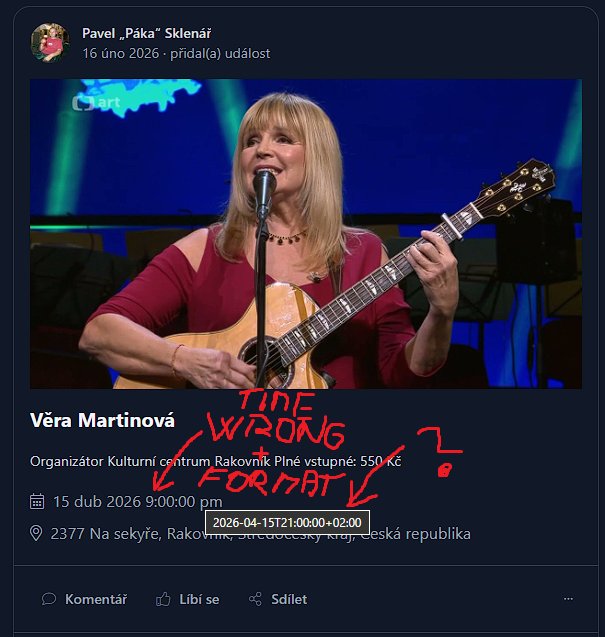 Snímek obrazovky 2026-02-16 152931.png
 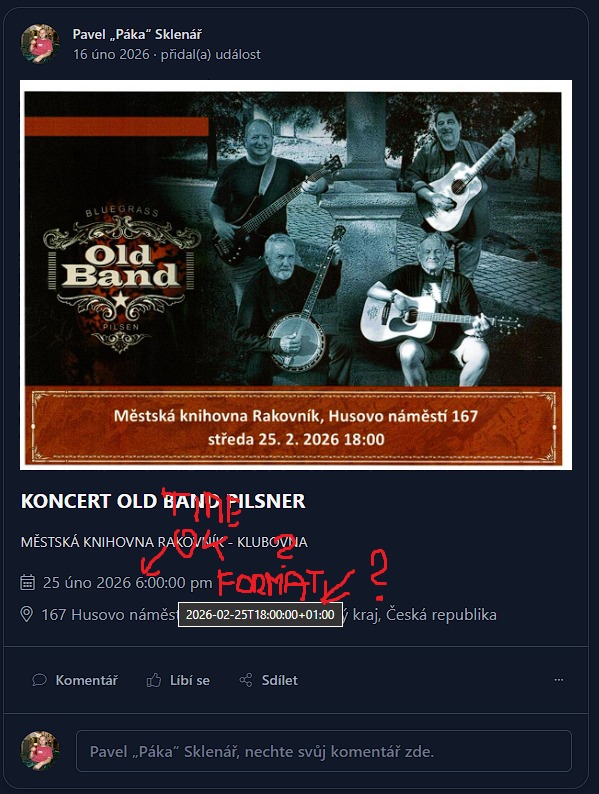 Snímek obrazovky 2026-02-16 152953.png