


Video Conversion
I want to upload videos but the conversion mechanism isn't functioning. After upload an image of the video appears but the video length shows 00.00 and when one clicks play nothing happens. It says "Video isn't published because video conversion failed, edit video to fix the issue." The videos are in the storage, yet wait in queue it appears. Please help point me in the right direction. Attached are screen shots of the database.
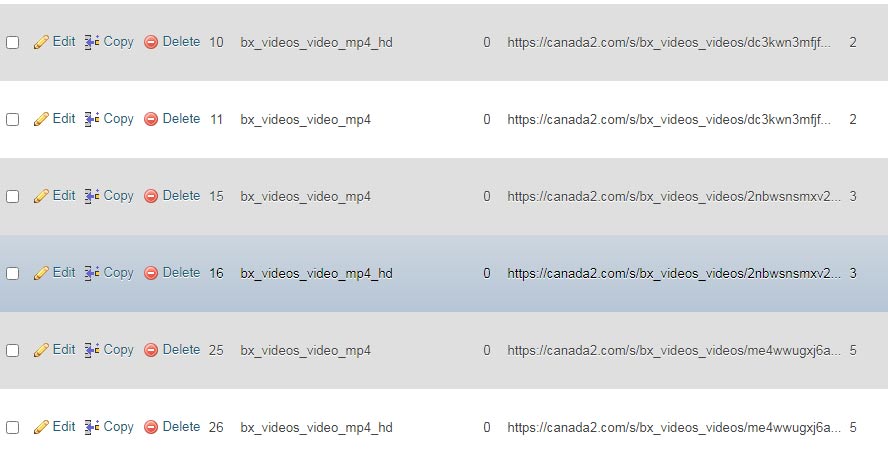
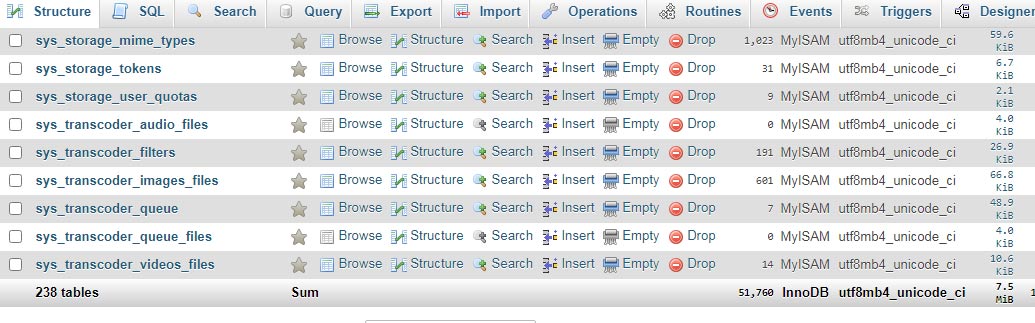
-

What is the extension file type for the videos you are trying to convert? MP4 etc?
-

Hi Will. Really appreciate you taking the time. My brain hurts! - I have tried several. Just your basic mp4 files, and whatever comes off my phone. Also it appears that I am unable to delete the failed videos from the management page. Interesting to note that one 15 mg video did work for some unknown reason. but a dozen attempts, even with the same file, failed conversion. All waiting in the queue it looks like from the databse. Also I cannot delete the corrupted videos. the check box is greyed out and the delete is unresponsive. attaching a photo here.
-
Hey, i think i had same issue, i'm on my way home and will look at my notes.
-
I'm in NY and stuck in traffic, please give me till 8-8:30pm EST time and i will try to help you. :)
-
I am in Toronto so I'm free whenever. Thanks so much. Damn traffic!
-
Yes!!!
-
Videos are processed by ffmpeg. When ffmpeg runs it generates an output of the coding/decoding/etc it is performing. This output; since it is ran through cron, should be sent to the email assigned to the cron or it may be sent to the email for root if an email is not assigned. Looking at the output of ffmpeg may help to track down why it is failing. I will see if I can locate a similar cron output on my server so you can see an example output.
-
The output will probably be in the owner of the cron job email, if the owner is root, then look in the email for root. The included output is not from a UNA site but the output from ffmpeg will be similar. Look for error messages; the larger the video file, the larger the ffmpeg output will be as it runs through the frames.
ffmpeg version N-54690-g682990a849-static https://johnvansickle.com/ffmpeg/ Copyright
(c) 2000-2020 the FFmpeg developers
built with gcc 8 (Debian 8.3.0-6)
configuration: --enable-gpl --enable-version3 --enable-static --disable-debug --disable-ffplay
--disable-indev=sndio --disable-outdev=sndio --cc=gcc --enable-fontconfig --enable-frei0r
--enable-gnutls --enable-gmp --enable-libgme --enable-gray --enable-libfribidi --enable-libass
--enable-libfreetype --enable-libmp3lame --enable-libopencore-amrnb --enable-libopencore-amrwb
--enable-libopenjpeg --enable-librubberband --enable-libsoxr --enable-libspeex --enable-libsrt
--enable-libvorbis --enable-libopus --enable-libtheora --enable-libvidstab --enable-libvo-amrwbenc
--enable-libvpx --enable-libwebp --enable-libx264 --enable-libx265 --enable-libxml2
--enable-libxvid --enable-libzimg
libavutil 56. 60.100 / 56. 60.100
libavcodec 58.111.101 / 58.111.101
libavformat 58. 62.100 / 58. 62.100
libavdevice 58. 11.102 / 58. 11.102
libavfilter 7. 88.100 / 7. 88.100
libswscale 5. 8.100 / 5. 8.100
libswresample 3. 8.100 / 3. 8.100
libpostproc 55. 8.100 / 55. 8.100
Input #0, mov,mp4,m4a,3gp,3g2,mj2, from '/redacted':
Metadata:
major_brand : qt
minor_version : 0
compatible_brands: qt
creation_time : 2021-03-06T15:13:39.000000Z
Duration: 00:04:59.78, start: 0.000000, bitrate: 790 kb/s
Stream #0:0(und): Audio: aac (LC) (mp4a / 0x6134706D), 44100 Hz, stereo, fltp,
96 kb/s (default)
Metadata:
creation_time : 2021-03-06T15:13:39.000000Z
handler_name : Core Media Audio
Stream #0:1(und): Video: h264 (Main) (avc1 / 0x31637661), yuv420p(tv, bt709),
568x320, 690 kb/s, 24 fps, 24 tbr, 24k tbn, 48k tbc (default)
Metadata:
creation_time : 2021-03-06T15:13:39.000000Z
handler_name : Core Media Video
encoder : H.264
Stream mapping:
Stream #0:1 -> #0:0 (h264 (native) -> mjpeg (native))
Press [q] to stop, [?] for help
[swscaler @ 0xc6a6fc0] deprecated pixel format used, make sure you did set range
correctly
Output #0, image2, to '/redacted':
Metadata:
major_brand : qt
minor_version : 0
compatible_brands: qt
encoder : Lavf58.62.100
Stream #0:0(und): Video: mjpeg, yuvj420p(pc), 568x320, q=2-31, 200 kb/s, 24 fps,
24 tbn, 24 tbc (default)
Metadata:
creation_time : 2021-03-06T15:13:39.000000Z
handler_name : Core Media Video
encoder : Lavc58.111.101 mjpeg
Side data:
cpb: bitrate max/min/avg: 0/0/200000 buffer size: 0 vbv_delay: N/A
frame= 1 fps=0.0 q=5.1 Lsize=N/A time=00:00:00.04 bitrate=N/A dup=1 drop=1 speed=2.52x
video:22kB audio:0kB subtitle:0kB other streams:0kB global headers:0kB muxing overhead:
unknown
-
Thanks Will. I did insert my email into the cpanel and will run a job (upload a vid) to see what pops up.
-
Put a support ticket in at TMD in hopes someone there may have some experience with this sort of thing. Funny I remember going through something similar on Dolphin way back in 2008 with the same ffmpeg.exe lol
-
Here is a letter from TMD Hosting support - they were very kind but couldn't help. Its a UNA issue they say. I must have configured something wrong but I don't know what it could possibly be.
**********************************
Hello,
Thank you for your patience up to now.
We have thoroughly reviewed your concern and would like to inform you that we were able to recreate the issue from our end.
We have tried to resolve the issue which you are currently experiencing with your website but regrettably, all attempts were unsuccessf
However, according to our investigations, the UNA script uses the build-in ffmpeg and not the server's one, therefore the issue is related directly to the bug of UNA cms since the server meets all requirements as could be verified via Dashboard - Server Audit
The executable ffmpeg file is located in ....
Here is the video conversion log:
-------------------------------------------------------------------------
We would recommend you contact the vendor and developers of the UNA cms who should be able to review this and provide you with additional information, as unfortunately, this is out of our area of expertise as a hosting provider.
Thank you for understanding and do not hesitate to contact us again if we could be of any further assistance!
Best Regards,
Roy Herman
Technical Support Team
-
filter failed: applyFilter_Mp4
---
/home/canadaco/public_html/plugins/ffmpeg/ffmpeg.exe -y -i '/home/canadaco/public_html/tmp/33444snake_reptile_animal_crawler_creepy_681.mp4' -vframes 1 -f image2 -an '/home/canadaco/public_html/tmp/95402.jpg' 2>&1
ffmpeg version 4.4-static /ffmpeg/ Copyright (c) 2000-2021 the FFmpeg developers
built with gcc 8 (Debian 8.3.0-6)
configuration: --enable-gpl --enable-version3 --enable-static --disable-debug --disable-ffplay --disable-indev=sndio --disable-outdev=sndio --cc=gcc --enable-fontconfig --enable-frei0r --enable-gnutls --enable-gmp --enable-libgme --enable-gray --enable-libaom --enable-libfribidi --enable-libass --enable-libvmaf --enable-libfreetype --enable-libmp3lame --enable-libopencore-amrnb --enable-libopencore-amrwb --enable-libopenjpeg --enable-librubberband --enable-libsoxr --enable-libspeex --enable-libsrt --enable-libvorbis --enable-libopus --enable-libtheora --enable-libvidstab --enable-libvo-amrwbenc --enable-libvpx --enable-libwebp --enable-libx264 --enable-libx265 --enable-libxml2 --enable-libdav1d --enable-libxvid --enable-libzvbi --enable-libzimg
libavutil 56. 70.100 / 56. 70.100
libavcodec 58.134.100 / 58.134.100
libavformat 58. 76.100 / 58. 76.100
libavdevice 58. 13.100 / 58. 13.100
libavfilter 7.110.100 / 7.110.100
libswscale 5. 9.100 / 5. 9.100
libswresample 3. 9.100 / 3. 9.100
libpostproc 55. 9.100 / 55. 9.100
Input #0, mov,mp4,m4a,3gp,3g2,mj2, from '/home/canadaco/public_html/tmp/33444snake_reptile_animal_crawler_creepy_681.mp4':
Metadata:
major_brand : isom
minor_version : 512
compatible_brands: isomiso2avc1mp41
encoder : Lavf54.63.104
Duration: 00:00:12.03, start: 0.000000, bitrate: 3862 kb/s
Stream #0:0(jpn): Video: h264 (High) (avc1 / 0x31637661), yuv420p, 1920x1080 [SAR 1:1 DAR 16:9], 3727 kb/s, 29.97 fps, 29.97 tbr, 30k tbn, 59.94 tbc (default)
Metadata:
handler_name : VideoHandler
vendor_id : [0][0][0][0]
Stream #0:1(jpn): Audio: aac (LC) (mp4a / 0x6134706D), 44100 Hz, stereo, fltp, 131 kb/s (default)
Metadata:
handler_name : SoundHandler
vendor_id : [0][0][0][0]
Stream mapping:
Stream #0:0 -> #0:0 (h264 (native) -> mjpeg (native))
Press [q] to stop, [?] for help
[swscaler @ 0x7bd9580] deprecated pixel format used, make sure you did set range correctly
Output #0, image2, to '/home/canadaco/public_html/tmp/95402.jpg':
Metadata:
major_brand : isom
minor_version : 512
compatible_brands: isomiso2avc1mp41
encoder : Lavf58.76.100
Stream #0:0(jpn): Video: mjpeg, yuvj420p(pc, progressive), 1920x1080 [SAR 1:1 DAR 16:9], q=2-31, 200 kb/s, 29.97 fps, 29.97 tbn (default)
Metadata:
handler_name : VideoHandler
vendor_id : [0][0][0][0]
encoder : Lavc58.134.100 mjpeg
Side data:
cpb: bitrate max/min/avg: 0/0/200000 buffer size: 0 vbv_delay: N/A
frame= 1 fps=0.0 q=6.8 size=N/A time=00:00:00.03 bitrate=N/A dup=1 drop=0 speed=0.412x
frame= 1 fps=0.0 q=6.8 Lsize=N/A time=00:00:00.03 bitrate=N/A dup=1 drop=1 speed=0.255x
video:65kB audio:0kB subtitle:0kB other streams:0kB global headers:0kB muxing overhead: unknown
---
/home/canadaco/public_html/plugins/ffmpeg/ffmpeg.exe -y -i '/home/canadaco/public_html/tmp/33444snake_reptile_animal_crawler_creepy_681.mp4' -strict experimental -vcodec libx264 -s 854x480 -b:v 512k -movflags +faststart -acodec aac -ar 44100 -b:a 128k -pix_fmt yuv420p '/home/canadaco/public_html/tmp/98489.mp4' 2>&1
ffmpeg version 4.4-static /ffmpeg/ Copyright (c) 2000-2021 the FFmpeg developers
built with gcc 8 (Debian 8.3.0-6)
configuration: --enable-gpl --enable-version3 --enable-static --disable-debug --disable-ffplay --disable-indev=sndio --disable-outdev=sndio --cc=gcc --enable-fontconfig --enable-frei0r --enable-gnutls --enable-gmp --enable-libgme --enable-gray --enable-libaom --enable-libfribidi --enable-libass --enable-libvmaf --enable-libfreetype --enable-libmp3lame --enable-libopencore-amrnb --enable-libopencore-amrwb --enable-libopenjpeg --enable-librubberband --enable-libsoxr --enable-libspeex --enable-libsrt --enable-libvorbis --enable-libopus --enable-libtheora --enable-libvidstab --enable-libvo-amrwbenc --enable-libvpx --enable-libwebp --enable-libx264 --enable-libx265 --enable-libxml2 --enable-libdav1d --enable-libxvid --enable-libzvbi --enable-libzimg
libavutil 56. 70.100 / 56. 70.100
libavcodec 58.134.100 / 58.134.100
libavformat 58. 76.100 / 58. 76.100
libavdevice 58. 13.100 / 58. 13.100
libavfilter 7.110.100 / 7.110.100
libswscale 5. 9.100 / 5. 9.100
libswresample 3. 9.100 / 3. 9.100
libpostproc 55. 9.100 / 55. 9.100
Input #0, mov,mp4,m4a,3gp,3g2,mj2, from '/home/canadaco/public_html/tmp/33444snake_reptile_animal_crawler_creepy_681.mp4':
Metadata:
major_brand : isom
minor_version : 512
compatible_brands: isomiso2avc1mp41
encoder : Lavf54.63.104
Duration: 00:00:12.03, start: 0.000000, bitrate: 3862 kb/s
Stream #0:0(jpn): Video: h264 (High) (avc1 / 0x31637661), yuv420p, 1920x1080 [SAR 1:1 DAR 16:9], 3727 kb/s, 29.97 fps, 29.97 tbr, 30k tbn, 59.94 tbc (default)
Metadata:
handler_name : VideoHandler
vendor_id : [0][0][0][0]
Stream #0:1(jpn): Audio: aac (LC) (mp4a / 0x6134706D), 44100 Hz, stereo, fltp, 131 kb/s (default)
Metadata:
handler_name : SoundHandler
vendor_id : [0][0][0][0]
Stream mapping:
Stream #0:0 -> #0:0 (h264 (native) -> h264 (libx264))
Stream #0:1 -> #0:1 (aac (native) -> aac (native))
Press [q] to stop, [?] for help
[libx264 @ 0x5a16200] using SAR=1280/1281
[libx264 @ 0x5a16200] using cpu capabilities: MMX2 SSE2Fast SSSE3 SSE4.2 AVX FMA3 BMI2 AVX2 AVX512
Error initializing output stream 0:0 -- Error while opening encoder for output stream #0:0 - maybe incorrect parameters such as bit_rate, rate, width or height
[aac @ 0x5a1c9c0] Qavg: 27915.875
[aac @ 0x5a1c9c0] 2 frames left in the queue on closing
Conversion failed!
-
Hello @Stardreamer !
As I remember from some previous provided by you info your current server has not so big value of the memory_limit parameter (like 128Mb). You may ask your hosting to increase it. Also, you may ask the max_execution value too.
-
Thanks for taking the time to help me. Yes TMD Hosting have that 128 mg limit. They wouldn't put it higher. Years ago I had a VPN with them. Never a great experience, even though the people are kind there. Time to look into the cloud servers, right Leonid? In the meantime I will see about the max_execution
-
Here is why the conversion failed:
Error initializing output stream 0:0 -- Error while opening encoder for output stream #0:0 - maybe incorrect parameters such as bit_rate, rate, width or height
If TMD stated they have ffmpeg for you to use, then you can point UNA to use their ffmpeg. Contact TMD to know what the path is to their ffmpeg.
-
wow great idea Will. Thanks, I will follow up on that. I didn't realize they said that. I'm just looking at the cloud pricing and wondering how good is it? Years ago I had a VPN on TMD with Dolphin sites. It was very lonely and tough to figure out. :-)
-
I understand.
-
We are experiencing the same issues with TMD Hosting on a dedicated server. The videos upload fine but then hang in the conversion process infinitely
-
Hello @Everquin, LLC !
So did you ask about their path to FFmpeg tool?

