


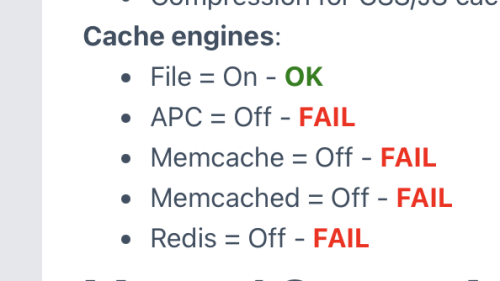
These FAILures, according to the Server Audit in the screenshot below, seem to imply that more than 1 cache engine could be installed. If this is not the case, which one is preferred for the UNA platform?
In other words, I am asking: Is it OK to check off more than one of these cache engines in the PHP extension settings?
Thank you!

Before you update to the next UNA Beta, check that your php version is 8.2 or greater. Via the Server Audit.
And in your site's hidden htaccess file, if applicable.
Hopefully, more people will abandon Facebook. And that interest in UNA will continue to grow.
Obviously, the red-eyed Mark Zuckerturd is not satisfied to have taken over a huge percentage of the world's advertising market. Now he needs more money for his AI data centers which will take up enough power for hundreds of thousands of homes.
These data centers will allow for even more fake AI content on his platform. More ad revenue and more opportunities to sell user's personal information.

After the last UNA update, I noticed the view counts have dramatically dropped. It appears that only logged-in users are being counted for views.
Has anyone else noticed this? Is there a Setting regarding views, btw?
Obviously, most visitors and viewers are not Members.
[19-Jan-2026 04:20:03 UTC] PHP Deprecated: preg_replace_callback(): Passing null to parameter #3 ($subject) of type array|string is deprecated in /home/mtnempco/public_html/---------.com/inc/classes/BxDolTemplate.php on line 3177
Safari error: ReferenceError: "Can't find variable: oTimelineViewOutlinePublic" followed by several lines concerning the gzip file.
Even after turning off the new Wiki app, the problem remains. I cleared all the caches, including browser.
15.0.0-A2. Anything come to mind?
RE: Changing storage from external back to Local.
Previously recorded here by @Wise: Also, you must manually move files, and manually set database for storage engine. UNA will NOT switch from Local if a file exists.
You must move them. Then goto storage database and change the engine manually.
Question: What is this database table called? I can't find it. I have, of course, changed these values in the UNA general Settings, in the Storage section.
THANK YOU!

@PavelS was discussing the big server hit for video processing in a previous post. This issue warrants a separate thread, imo.
Perhaps someone could turn this idea into a mod or even build it into future versions of UNA. The UNA developers host their own servers but still they have made a path for remote video processing, which is certainly going beyond the call of duty.
Here's a short overview of how linux and/or ffmpeg can be adjusted, courtesy of Google. Obviously, in a shared environment, server modifications are limited. Please let us know if your own experimentation produces good results.
1. Using OS-level Commands (Recommended on Linux)
These tools help manage how much of the server's resources the FFmpeg process can consume, which is the best approach for a shared environment.
nice: This command adjusts the CPU priority of a process. A higher "niceness" value means lower priority, so the process will run in the background when other tasks need CPU time.- bash
nice -n 19 ffmpeg -i input.mp4 [other ffmpeg options] output.mp4
- (A niceness of 19 is the lowest priority).
cpulimit: This utility can explicitly limit the percentage of CPU usage for a process. You will likely need to install this tool if it's not available.- bash
cpulimit -l 50 -- ffmpeg -i input.mp4 [other ffmpeg options] output.mp4
- (The
-l 50option attempts to limit the process to 50% of one CPU core's capacity. The value depends on the number of cores available; consult thecpulimitdocumentation for the correct value for your server). - Combining
niceandcpulimit: - bash
nice -n 19 cpulimit -l 50 -- ffmpeg -i input.mp4 [other ffmpeg options] output.mp4
- (Make sure to add the
--before the FFmpeg command if usingcpulimit). taskset: This command can confine a process to specific CPU cores.- bash
taskset -c 0 ffmpeg -i input.mp4 [other ffmpeg options] output.mp4
- (This runs FFmpeg only on the first core (core 0)).
2. Using FFmpeg's Built-in Options
You can also use options within the FFmpeg command itself to reduce its resource demands.
-threads: This option (when placed after the input file) can limit the number of threads FFmpeg uses for encoding. Setting it to1can significantly reduce CPU load, though it might not always strictly limit to a single core for all codecs.- bash
ffmpeg -i input.mp4 -threads 1 [other ffmpeg options] output.mp4
- Encoding Presets: Using a faster encoding preset reduces the computational complexity of the encoding process, thus using less CPU per frame, though this may impact quality. Presets range from "ultrafast" to "veryslow".
- bash
ffmpeg -i input.mp4 -c:v libx264 -preset fast [other ffmpeg options] output.mp4
3. General Considerations
Run Processes in the Background: Use job management systems (like message queues or simple shell job operators like &, wait) to manage multiple concurrent FFmpeg tasks. This prevents new encoding jobs from launching until previous ones are complete or resources are available.
Avoid Concurrent Runs: The core problem with shared hosting is often multiple FFmpeg instances running simultaneously. Implement logic to ensure only one (or a limited number) of FFmpeg processes runs at any given time.
Check Server Limits: Be aware of the specific CPU and memory limits imposed by your shared hosting provider. Maxing these out can lead to your processes being terminated or your account suspended.


From the UNA Wiki we read about remote video transcoding: Install UNA on separate server(s), but connect to the same DB which your main site is using.
What does a path for this connection like this look like, using example.com as the main UNA server instance?
Does this path belong in the inc/header file of the remote server along with similar transcoding settings? Where might that be?
