-
 Has a lot of potential, needs additions. :)
-
 Comment by unknown is hidden.
-
After the purchase you should be able to download and install Jot messenger from your site > Studio > Apps Market > Purchases
Please note, that Jot Messenger requires Jot Server to be installed:
https://github.com/unaio/jot-server
-
-
Audio/ Video calls feature ??
-
So, after purchase, I have installed Jot messenger from my site. However I need help getting Jot Server installed. HELP!!!
-
have a quick question...will there be an option in a future update to allow the clearing of all messages within the shoutbox without having to "delete lot" I have noticed issues with deleting lot in the shoutbox. An option to do basically a mass removal of all messages within the shoutbox would be a great one. Maybe even an option to do a scheduled purge of the shoutbox at a specific interval set by the admin.
-

Alexey - can you please review this?
-
it's a great idea. the messages are all stored in sql tables. i haven't looked to see if each shoutbox inherits its own column, or it just all writes into the same table sequentially across all shout boxes (for example i have a shout box on each group page to provide group chat). i would assume the home page shout box is the parent here, but maybe that's not how the architecture is set up..
-
Hello!
We have this option in queue and it will be added to the version in nearest update https://github.com/unaio/jot-client-una/issues/97
-
-
I just paid for Messenger and bought the Jot Server install. I sent an email to the installer with my ssh root access and IP address. Anything else I need to do? Do I need to install jitsi server or does that come with the jot install?
-
Hello, I have installed the files for the Messenger. My next question is how to make it visible. I have reviewed the Messenger Page and added the Shoutbox, but still no display, can you assist me. Thanks
-
Got a question, what makes the messenger connection fail? were users are not receiving the dm in a Realtime mode, thanks!
-
hey! i need a little help getting jot server to work.. i have a VPS.. Ive installed node, seems ok.. and jot server. but the page is blank,.,.
THere may be an issue with the sever certificate locations, its a littlle confusing,.. can you please help as ive tried everything now and i cant get it working.
-
-
Hello!
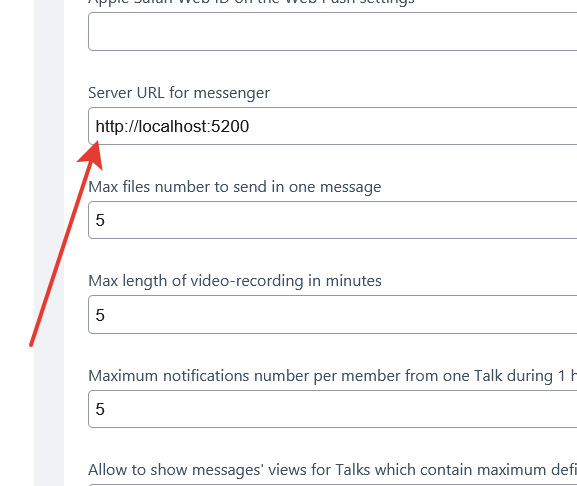
Looks like you forgot to add link to the Server where you have Jot Server installed in Studio->Messenger settings
-
Thanks a lot Alexey , it was only that setting to add (http://localhost:5200) and working perfect now!
Pd: would be best use the https, so https://localhost:5200 or it does not matters?
-
Very nice Chat, congrats!
If I may request few more features:
1) Ability to record audio messages with admin defined length in minutes and encoding bitrate.
2) Ability to have collapsible trees of conversation both in privat chats and group chats.
-
Hello, i install jot server but messenger is not working
-
Please i need help with the jot server
-
Hello!
You can find info about installation here https://github.com/unaio/jot-server
Also there are several vendors provides service for Jot Server installation.
-

If you have installed the JotServer with Docker and the UNA core component is functioning correctly on the server but the Messenger service is working inside the container, the issue is most commonly related to port mapping or SSL configuration.
Even if the port is exposed internally within the Docker network and appears open on the server, the problem may still be caused by:
- Incorrect Docker port binding
- Reverse proxy misconfiguration
- Missing or invalid SSL certificate
- WebSocket handshake failure
To properly resolve this, you should configure a reverse proxy for the Messenger service and host it on a dedicated subdomain, for example:
messenger.yoursite.com
By attaching a valid SSL certificate and using Caddy as a reverse proxy on port 443, you allow Caddy to handle the TLS handshake and securely forward traffic to the Dockerized JotServer instance. The Messenger application should then be configured to use only the secure subdomain URL.
For this setup to function correctly, the following must be ensured:
- DNS A record for the subdomain points to your server IP.
- SSL certificates are properly issued (either automatic via Caddy or manually provided).
- Docker container networking is correctly defined.
- The Messenger container port (e.g., 5000) is accessible to Caddy.
- WebSocket traffic is properly proxied.
Below is a production-ready Caddyfile example using UNA environment variables:
{$UNA_MESSENGER_HOSTNAME} {

      log {
            output discard
      }

      tls {$UNA_TLS}

      encode zstd gzip

      @api {
            path /config
            path /healthz
            path /stats/errors
            path /stats/checker
      }

      @static {
            path /static
      }

      @notstatic {
            not path /static
      }

      @imageproxy {
            path /image_proxy
      }

      header {
            Strict-Transport-Security "max-age=31536000; includeSubDomains; preload"
            X-XSS-Protection "1; mode=block"
            X-Content-Type-Options "nosniff"
            Permissions-Policy "cookies=(self), accelerometer=(self), autoplay=(self), camera=(self)"
            Referrer-Policy "no-referrer"
            X-Robots-Tag "noindex, noarchive, nofollow"
            -Server
      }

      header @api {
            Access-Control-Allow-Methods "GET, POST, OPTIONS"
            Access-Control-Allow-Origin "*"
      }

      # Reverse proxy to the JotServer / Messenger container
      handle {
            import env_redirect
            import hidden_files

            reverse_proxy localhost:5000 {
                   header_up X-Forwarded-Port {http.request.port}
                   header_up X-Real-IP {remote_host}
                   header_up X-Forwarded-Proto {scheme}
            }
      }

      @unknown {
            not path /*
      }

      handle @unknown {
            reverse_proxy {$UNA_SECURITY_HOSTNAME}:443
      }
}
With this configuration, Caddy:
- Terminates SSL on port 443
- Automatically supports WebSockets
- Forwards traffic securely to the Messenger container
- Ensures correct proxy headers are passed
In order to use this configuration you have to make also reverse proxy to UNA with Caddy Server . If need help just let me know.
-
-
Why Livestream to YouTube? Why should we work for YouTube? Can it be Livestreamed directly on our website?
-

When I updated to RC2 I was unable to install this new version of the Messenger. The system kept the old version, even I cannot "uninstall it". When I go to "update apps" it is still there See images below:
when I click on it, it disappear and the "downloaded section show the image below)..
Then when I click install...the newer version above does not show in the apps installed (it shows the older one):
and when I go back to the "update", I find the newer version still sitting there as shown below:
Then I tried to delete the module and install it again, but I got this message:
but will never uninstall it.
Any help on this please?
-
Hello @Tajrebatee ,
Looks like Messenger's files were modified. If you are sure that you didn't change anything in core Messenger files, you can enabled in Sutdio->Settings->Site settings area option Force auto-update, even if some files were modified and then try to install update and then try to install update again. Don't forget to uncheck the option after installation.
-
Thanks @Alexey. I am pretty sure I didn't change the messenger. And I already inserted the most updated version already. Do you think I need to uninstall and install back? will this fix the issue of "Push notifications"? (BTW: messages work well, but issue is that push notifications are not) tnx
-
Looks like push got stuck somewhere...
-
Trayng to install in una: "The module is not compatible with your version of UNA" (Una Version: 12.1.1-DEV1 Messenger Version: 12.0.7). where can be download messenger with a version compatible with UNA 12? Only one version is available here, where are the others? why is compatibility not specified in the market with una-core.xxx?
-
Hello!
I have answered here https://una.io/cmts-view/182sebh?sys=bx_forum&cmt_id=44737
-
-

Do you have API end point for UNA Messenger? my goal is to be able sent notification from external
-

Exciting updates. Will make UNA more modern and enable new revenue & engagement opportunities for UNA powered communities.
Reviews to Messenger